 admin
Short answer: You can get a useful first read of any single page in about three minutes with SEOquake, a free Chrome extension from Semrush. Open the page, read the Quick View, run the Audit tab, check Keyword Density and Links in the Full Report, then decide whether the problem sits on this page or across the site. Three minutes is a time box, not a measured result: it is enough to spot obvious faults such as a missing title, a wrong canonical or a blocked page, and not enough to judge a whole site. For adult and escort businesses there is one extra step, because age gates and explicit-content rules can change what a crawler sees. This guide explains what SEOquake does after its September 2026 rebuild, gives a four-pass routine, shows what the same checks look like on a real page, lists the limits, and explains when to hand the work to a specialist. It makes no promise about rankings. It is general information, not legal advice.
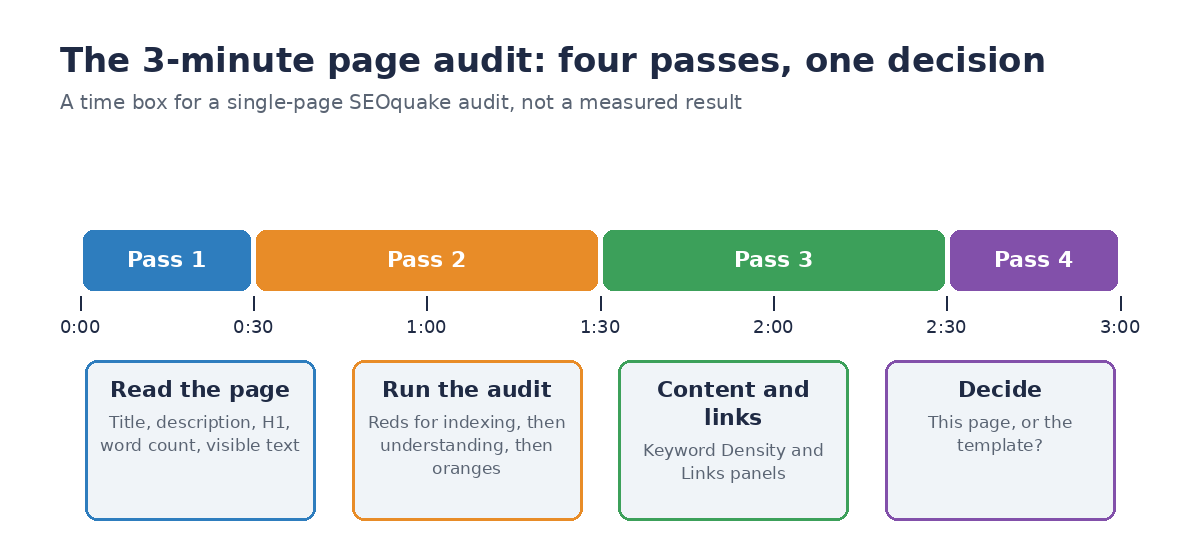
Figure 1. A four-pass routine for a single-page audit. The three minutes are a time box, not a measured result.
What SEOquake is, and what changed in 2026
SEOquake is a free browser extension for Chrome. Semrush relaunched it on 9 September 2026, saying some metrics relied on data sources that had shut down or could no longer be read reliably, and that the interface was dated. We ran version 4.3.0 from the Chrome Web Store in a fresh browser profile on 1 November 2026, and the screenshots in this guide are from that run.
What the rebuilt version offers, according to Semrush’s post:
- SEObar: selected metrics shown on the page while you browse, with placement and appearance you can change.
- Quick View: a pop-up snapshot.
- Full Report: deeper panels for auditing, keyword density, links, comparisons and Semrush data.
- 28 page-level audit checks, up from 22.
- Keyword density for one- to four-word phrases, plus heading structure, word count and internal and external link details.
- Exports: CSV for Keyword Density, Links and Compare, and PDF for the audit.
What was removed or left out: the post lists Google Cache date, search engine index counts and Yandex IKS among removed metrics, along with legacy checks for meta keywords, Flash, frames and microformats. The SERP overlay and on-page nofollow and noindex highlighting were not included in this release, and Firefox and Opera versions are not included either. Chrome is the only officially supported browser, though the post says it should install in other Chromium-based browsers such as Edge, Brave and Arc.
If an older guide tells you to use SEOquake’s search-results overlay or its index counts, that advice is out of date for this version.
The tool is free, and Semrush says a Semrush account is optional for core features. It is needed for deeper backlink and traffic reporting. The extension shows public Semrush metrics where available, including Semrush Rank, estimated U.S. organic traffic, Traffic Cost and backlink data. Note that SEOquake is owned by a company that sells SEO software, and the tutorials we cite are published by Semrush and by Backlinko, which Semrush owns. We use them for what the tool does, not for opinions about rankings.
A note on permissions and privacy
Adult businesses have good reasons to be careful with browser extensions. The extension package for version 4.3.0 declares these permissions: storage, tabs, webRequest and contextMenus, with access to all websites. That is a broad set, and it is typical for an extension that reads and analyzes whatever page you open, but it means you should decide where to use it.
Semrush’s relaunch post does not describe how the extension handles data and points to Semrush’s general privacy policy, so read that policy before you rely on the tool for anything sensitive. Practical steps that cost nothing:
- Use a separate browser profile for audits, with no logged-in accounts and no personal bookmarks.
- Audit public pages only. Do not run an audit while an admin dashboard, a payment page or a private member area is the active tab.
- Do not connect a Semrush account unless you need the deeper data.
- Check the extension’s permissions in your browser’s extension page, and remove it when a project ends.
What to set up before you start
Preparation takes a few minutes once, then no time on later audits.
- Install the extension from the Chrome Web Store listing and pin it to the toolbar.
- Open the page in a clean window. A normal, logged-out view shows what a visitor and a crawler would see. A logged-in view can hide problems.
- Know the page’s job. Is it a service page, a listing, a category, a blog post? An audit result is only meaningful against the page’s purpose.
- Name the target question. Write down in one line what the page should answer and for whom.
- For adult sites, note the page’s access. Is it behind an age gate? Does it contain explicit material? Is it on a separate domain or subdomain? Google’s guidelines for sites with explicit content ask for explicit material to be kept on its own domain or subdomain where possible, labelled with the
adultrating or an RTA label, and for age gates to be handled so Googlebot is not blocked incorrectly. These details decide whether the page can be indexed at all.
The four-pass routine
Pass 1 (0:00 to 0:30): read the page
Open the Quick View. According to Backlinko’s tutorial it has five tabs: Page Info, Content, Audit, Schema and Semrush. Start with Page Info and Content.
Look for six things:
- The title. Google’s guidance on title links asks for a title on every page that is distinct and descriptive, concise, and free of keyword stuffing. The guide says there is no limit on the element, but Google truncates title links in results to fit the device width. Do not chase a character count; read the title and ask whether a person would understand the page from it.
- The meta description. Google’s snippet guidance says Google mostly builds snippets from page content and sometimes uses the meta description when it describes the page better. It sets no length limit, and asks for unique descriptions that summarize the page without keyword lists. A missing description is a low-priority gap on most pages; a duplicated one across a whole template is more important.
- The H1 and the heading outline. Is there one clear main heading that matches the title’s promise? Do the sub-headings read as an outline of the answer?
- Word count. A number on its own proves nothing. A service page with a few dozen words may be thin; a long page that never answers its question is not better.
- The language and the visible text. Does the page say what the business does, for whom and where?
- Anything odd. A title that does not match the page, a heading that is an image, text that looks auto-generated.
Pass 2 (0:30 to 1:30): run the audit
Switch to the Audit tab. Backlinko’s tutorial describes a colour code: green for a pass, orange for a warning, red for a failure and blue for contextual information. Semrush says the rebuilt audit runs 28 page-level checks. In the version we ran, the tab opens with counts of passed, error and warning items, then a “Needs Attention” list. Backlinko lists these areas among them: title tag and meta description length, canonical tags, robots.txt and meta robots directives, XML sitemap presence, Schema.org and JSON-LD validity (checked through Google’s Rich Results Test), hreflang tags, heading structure, missing image alt text, and crawling, indexation, security and mobile compliance.
Work down in this order. The order is our judgment, not the tool’s:
- Reds that affect indexing first. A
noindexdirective, a blocked page, or a canonical pointing somewhere else can keep a page out of results. - Reds that affect understanding second. Missing title, missing H1, broken structured data.
- Oranges third. Description length, image alt text, heading order.
- Blue last. Treat it as context, not a fault.
The Full Report’s On-Page SEO Audit panel (labelled “formerly Diagnosis”) gives the same checks in more detail, with a tip under each one and an Export as PDF button.
Three checks deserve a closer look, because getting them wrong has the biggest effect.
Canonical. Google’s canonical guidance describes rel="canonical" as a strong signal, not a command. It recommends absolute URLs and a self-referencing canonical on the preferred page, and warns against giving conflicting signals, such as a sitemap URL that disagrees with the canonical tag. In the audit, check that the canonical is the page you are looking at. If it points elsewhere, confirm that this is on purpose. When the same wrong canonical turns up on many pages, you have found a template problem, which is exactly what Pass 4 is for.
Robots directives. Google’s robots meta tag documentation explains that noindex keeps a page out of results, nofollow tells crawlers not to follow the page’s links, and nosnippet and max-snippet limit snippets. It also notes that a crawler must be able to fetch a page to see a noindex rule: if robots.txt blocks the page, the tag is never read. So a page that must stay out of results needs to stay crawlable.
Structured data. Google’s introduction to structured data recommends JSON-LD and the Rich Results Test, and says markup must follow the guidelines to be eligible for rich results. Valid markup does not guarantee a rich result. If the audit flags markup, open Google’s Rich Results Test on the same URL before you change anything.
Pass 3 (1:30 to 2:30): check content and links
Open the Full Report. Per Backlinko’s tutorial it has six panels: Page Info, Audit, Keyword Density, Links, Compare and Semrush. For a three-minute pass you need two.
Keyword Density. Semrush says it covers phrases of one to four words. Backlinko describes a keyword cloud and phrase tables with a “Found in” column. Use it to see what the page is actually about. If the most frequent phrase has nothing to do with the target question, the page is off-topic or over-templated. If one phrase repeats unnaturally, rewrite for people. One limit to remember: Backlinko notes the panel can include text from buttons and image labels, not just the main content, so a phrase that appears in every menu or button will inflate the result.
Links. Per Backlinko, the Links panel shows internal and external link status, anchor text, follow status and response codes, and exports to CSV. Check three things:
- Broken links. Any response code in the 4xx or 5xx range is a fault to fix or remove.
- Anchor text. Descriptive anchors help people and search engines; Google’s link best practices ask for descriptive text and discourage “click here.”
- External links. Do you know why each is there? For links you have been paid for or exchanged, Google’s guide to qualifying outbound links describes
rel="sponsored",rel="ugc"andrel="nofollow".
If you use the Compare panel, use it for a quick look at two similar pages, such as two service pages built from the same template. It supports Pass 4.
Pass 4 (2:30 to 3:00): decide
This is the step most quick audits skip. Ask one question: is this a problem with this page, or with the way the site builds pages like it?
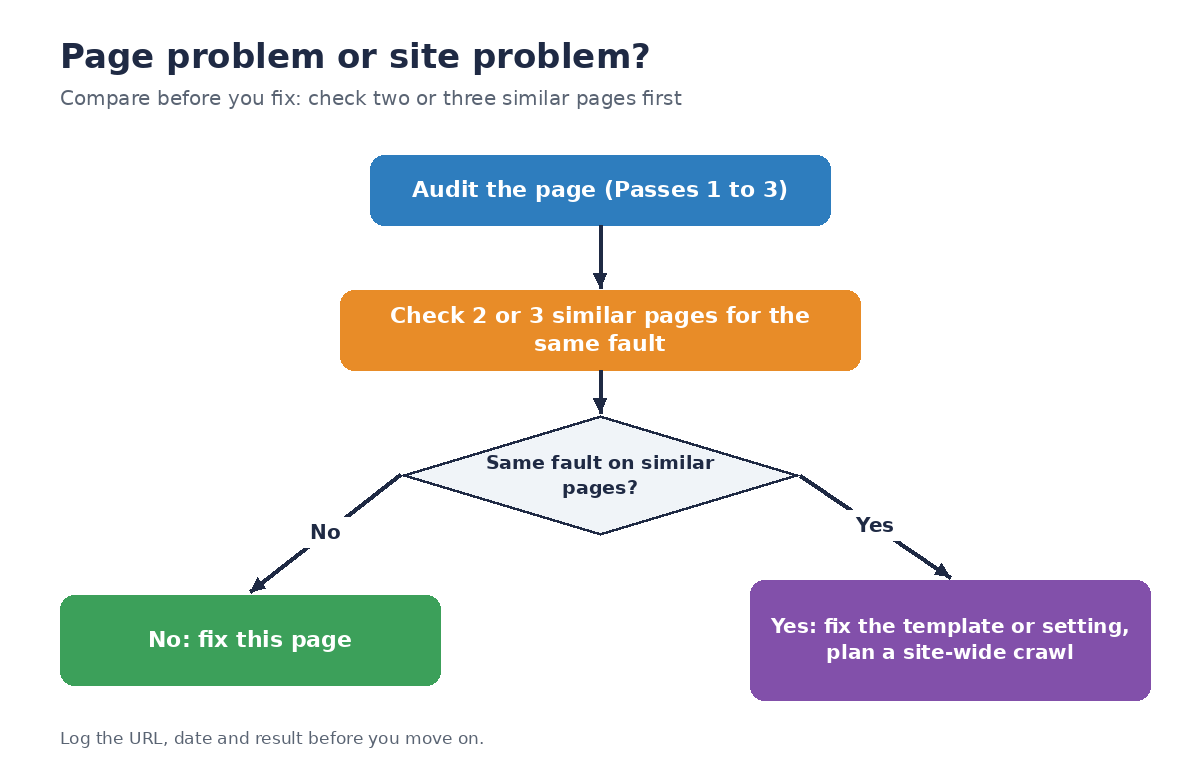
Figure 2. Compare before you fix. If the same fault shows on similar pages, treat it as a template or setting problem.
Open two or three similar pages and look at the same checks. If the title pattern, canonical, robots tag or heading structure shows the same fault on all of them, fix the template or setting, not the page. Backlinko’s tutorial makes the same point: the Quick View and Full Report audit a single page and do not crawl a site, so template-wide and sitemap problems need a site-wide tool. For that you can use a crawler such as Semrush’s Site Audit, which the tutorial promotes, or any other crawler you trust. Write down what you found, with the date and the URL, before you move on.
What SEOquake said about a real page
On 1 November 2026 we ran SEOquake 4.3.0 on one real page, escortmarketing.agency/adult-seo/, and read the Quick View and the Full Report. The results below are what the tool reported that day.
| Item | What SEOquake showed |
|---|---|
| Audit summary | 17 passed, 2 errors, 7 warnings |
| Errors | Open Graph tags missing; Twitter Card tags missing |
| Warnings | Title tag (47 characters); meta description (145 characters); internal links not checked; meta robots “review”; noindex tag “review”; HSTS missing; hreflang 0 tags |
| Passed, among others | Canonical valid (points to its own URL); robots.txt allows the page; HTTP 200; XML sitemap found; HTTPS with no mixed content; responsive design detected; all 10 images have alt text; heading structure “proper” (1 H1, 16 H2, 45 H3); schema found (FAQPage and BreadcrumbList, JSON-LD) |
| Page summary | 164 links (143 internal, 21 external); about 3,500 words |
| Links panel | 143 internal links, 47 unique, all followed, none nofollow; link status not checked |
| Keyword Density | Top one-word phrase “adult” (3.7%, 128 repeats), found in the title, description and H1; top two-word phrase “adult seo” |
Three things this real result teaches.
1. Read the tool’s reasons, not just its colours. The title warning says the title “may truncate or read short” and suggests 50 to 60 characters. The meta description warning suggests “135 characters or less for this check.” Those are the tool’s own thresholds. Google’s guidance, as we cited above, sets no length limit for either element and says truncation depends on the device width. A 47-character title that clearly describes the page is not a fault because it is under a rule of thumb. Use the warning as a prompt to read the title, not as an order.
2. Confirm a warning before acting on it. The page’s robots tag reads index, follow, max-image-preview:large. It contains no noindex, and the tool’s own technical check reports the page as indexable, with no X-Robots-Tag header present. Yet the audit lists “Meta Robots” and “Noindex Tag” as items to review, because the tool’s rule treats the extra directive as unusual. We read the tag, compared it with Google’s robots meta tag documentation, and found nothing blocking the page. That took one minute and saved a needless change.
3. A real gap can be minor. The two errors are missing Open Graph and Twitter Card tags, which control how a link looks when shared on social platforms. Google’s documentation that we cite does not list them as a ranking requirement. They are worth fixing for sharing, and they should not push a canonical or indexing problem down the list. The tool marks them red, which is a reminder that its colours rank severity within its own checklist, not importance to your business.
Also note what the tool does without an account. With no Semrush account connected, the Semrush tab still showed public figures for the page (for example an estimated search traffic figure, traffic cost and URL backlinks). We do not quote them, because they are estimates and depend on Semrush’s data.
What each colour should make you do
| Colour | Meaning (per Backlinko’s tutorial) | What to do |
|---|---|---|
| Green | Pass | Move on. Do not re-check a pass |
| Orange | Warning | Note it. Fix if it is cheap or affects many pages |
| Red | Failure | Check whether it is real, then fix or explain |
| Blue | Contextual information | Read it; no action unless it surprises you |
Before you fix a red, confirm it with a second source. A tool can misjudge a page that loads content with scripts, sits behind an age gate or serves different content to different visitors. Open the page source, search for the tag, and check with Google’s own tools such as Search Console if you have access.
Checks that matter on adult and escort sites
Standard audit lists do not cover the on-page constraints that apply to adult businesses. Add these checks after the four passes.
1. What does a crawler receive? If the page sits behind an age gate, a visitor sees a prompt before the page content. Google’s explicit-content guidelines say to handle age gates so that Googlebot is not blocked by mistake, and to verify Googlebot by its published method before serving it different content. Google’s page on verifying Googlebot explains how. SEOquake reads the page in your browser, after you have passed any gate, so it will not show you what a crawler sees. Test that separately by fetching the page without a browser and reading the HTML.
2. Is explicit content separated and labelled? The same guidelines describe keeping explicit material on a separate domain or subdomain, marking it with the adult rating or an RTA label and, where it applies, using the hasAdultConsideration structured data property. If an audit of a business-information page finds explicit images or text mixed in, treat that as a structure problem to fix, not just a content one.
3. Are image alt texts accurate and non-graphic? Alt text should describe the image in plain words. If the image is explicit, think carefully about whether it belongs on this page at all.
4. Do the links make sense? Adult sites attract link requests, link sellers and directory spam. In the Links panel, look for outbound links to sites you do not recognize, and check that any paid or exchanged links are qualified. Google’s spam policies list the link practices to avoid.
5. Is the page honest about what it offers? No guarantees of rankings or results, no invented reviews or numbers, and no claims you cannot support. A technical audit will not catch this, but a reader will.
6. Is anything on the page exposing private information? Review public author names, contact details and image details for information you did not intend to show. This is a privacy check, not an SEO one, and it matters more in this sector than most.
A simple audit log
An audit that is not recorded is not repeatable. Keep one row per page, per audit.
| Field | What to write |
|---|---|
| URL | The exact address audited |
| Date and time | Pages change; you need to know which version you saw |
| Page’s job | One line: what it should answer |
| Reds | Each failed check, with a note on whether you confirmed it |
| Oranges | Each warning, with a priority |
| Page or site? | The result of Pass 4 and the pages compared |
| Fix | What you will change, who owns it, by when |
| Re-check | The date you will run the audit again |
If you audit ten pages a month, the log shows patterns that one audit cannot: which template produces the same fault, which team fixes fastest, and whether changes held.
A three-minute checklist
Copy this into your notes.
0:00 to 0:30
- Title describes the page.
- Description is unique and readable.
- One H1, outline makes sense.
- Page says what it offers, for whom and where.
0:30 to 1:30
- No
noindexunless intended. - Canonical points to this page, or the exception is deliberate.
- Page is crawlable (not blocked in robots.txt).
- Structured data valid, or none.
- Reds noted; oranges noted.
1:30 to 2:30
- Top phrases match the target question.
- No broken links.
- Anchors are descriptive.
- External links explained, paid ones qualified.
2:30 to 3:00
- Same fault on two or three similar pages? Page or site decision made.
- Log written.
- Re-check date set.
For adult sites, add: what a crawler receives, explicit-content separation, alt text, private information.
What to fix first
| Priority | Examples | Why |
|---|---|---|
| 1 | noindex on a page that should rank; page blocked in robots.txt; canonical to the wrong page |
The page may not be indexed at all |
| 2 | Missing or duplicate titles; no H1; broken or invalid structured data you rely on | Search engines and people cannot tell what the page is |
| 3 | Broken internal links; unqualified paid links | Wasted crawling; policy risk |
| 4 | Thin or off-topic content; missing descriptions | Quality and click appeal |
| 5 | Alt text gaps; heading order; social preview tags | Accessibility and polish |
Within a priority, fix template faults before page faults, because one change repairs many pages.
Adjusting the audit by page type
The same four passes apply to every page, but each page type has its own likely faults. Use these as prompts, not as a checklist you must finish.
Service pages. These carry the commercial message, so check that the title and H1 say what you offer and where, that there is a clear next step, and that claims are supportable. Look at the Links panel for a path to contact and pricing pages. Because service pages are often built from one template, a fault here usually repeats across the set, so Pass 4 matters most.
Directory listing pages. Listings are built from data, so faults come from the template: identical titles, missing descriptions, canonical tags pointing to the wrong listing, and near-empty pages. Compare two or three listings. If they differ only by name and the audit shows the same text on each, consider whether the page offers enough to deserve its own address.
Category and location pages. Check that each has its own title, its own headings and text that is true for that category or place. Google’s spam policies cover many near-identical pages made mainly to rank, so a set of pages that differ only in the place name is a risk worth noting in the log.
Blog posts and guides. Check that the heading outline answers the question, that sources are linked, that the author and date are visible and that the page links to related pages with descriptive anchors. Keyword Density is useful here to see whether the main phrase matches the topic.
Age-gate and entry pages. The gate may be the only thing a crawler sees. Check what the page returns without a browser, and make sure the gate does not block the pages behind it from being crawled when they are meant to be public.
A fifteen-minute weekly routine
Once the three-minute habit is in place, a short weekly routine keeps it useful.
- Pick five pages. Choose by business value: the pages that bring enquiries, the newest pages and one page from each template.
- Run the four passes on each, about three minutes per page.
- Log the results in one sheet.
- Look for repeats. Any fault that appears on two pages goes on the template list.
- Hand over the list. Send the owner of the template a short note: the fault, the example URLs and the date.
After a month you will have twenty audits and a clear list of template faults. That is a stronger starting point for a larger audit, or for a conversation with a specialist, than any single result.
How to report the result to someone who is not technical
Owners and clients want to know what to do, not what a tag is. A good summary has four parts.
- What we checked. One line: “We checked ten pages on the site on 1 November.”
- What matters. The one to three faults that could stop pages being found or understood, in plain words.
- What it affects. How many pages share the fault, and why that matters.
- What we recommend, and what we do not know. The fix, who owns it, and any limits, such as “this check does not show what crawlers receive behind the age gate.”
Avoid scores without explanation. A number such as “82 out of 100” invites questions you cannot answer, and nothing in this guide depends on one.
What SEOquake cannot tell you
Be clear about the limits so you do not over-read a result.
- It audits one page. It does not crawl your site. Backlinko’s tutorial says sitemap and template-wide schema problems need a site-wide tool.
- It does not see what a crawler sees behind a gate. It reads the page as your browser shows it.
- Keyword Density can include button and label text, so it is a rough guide.
- It does not tell you how a page ranks or why. An audit checks the page against a list; rankings depend on many other things.
- Its thresholds are its own. Title and description length tips, for example, are the tool’s rules of thumb, not Google requirements.
- Some data needs a Semrush account. Deeper traffic and backlink reports require connecting one.
- The tool changes. The September 2026 rebuild removed features that older tutorials still describe. Check the current version.
- Three minutes is a time box. A complex page, a page with scripts or a long page may need more.
Common mistakes
- Fixing the page when the template is the problem.
- Treating orange as red, and spending a day on alt text while a canonical is wrong.
- Trusting a length number over reading the title.
- Auditing a logged-in view and missing what visitors see.
- Forgetting that an age gate changes what a crawler receives.
- Using advice written for the old version of the tool.
- Not logging the result, so the same faults come back.
- Changing several things at once, then not knowing which one mattered.
- Promising results from a clean audit. A passing audit means fewer faults, not a ranking.
When three minutes is not enough: hire an adult and escort SEO specialist
A single-page audit is a good habit. It is not a strategy. You need more help when:
- The same faults appear across many pages.
- You have thousands of URLs, several domains or several languages.
- Pages sit behind age gates and you cannot tell what crawlers receive.
- You have lost traffic and cannot find the cause.
- You are about to migrate a site or change templates.
- You do not have the time to run and record audits regularly.
If you decide to hire an adult and escort SEO specialist, ask for specifics rather than promises. Google’s page on hiring an SEO warns against guaranteed rankings. Good questions:
- What would you check first, and what will I receive at the end of the audit?
- How do you handle age gates and explicit-content separation?
- Will you use a site-wide crawl, Search Console and server logs, not just a browser extension?
- How will you tell me what you could not verify?
- What access do you need, and how do you protect it?
- Who owns the work, and what happens when the contract ends?
Red flags: a guaranteed ranking, a “free audit” that is a sales script with no findings, requests for passwords or identity documents, and a report that is only a screenshot of a score.
Escort Marketing Agency (EMA) is a digital marketing agency for adult businesses, not an adult service. On its adult SEO page, EMA describes a free audit as a focused review of your public website that flags visible obstacles and questions for deeper investigation; EMA states that it is not a full crawl or an account-level analytics audit. If you want a second pair of eyes after running your own three-minute audit, you can ask for a free audit report and compare its findings with yours. Apply the same questions to EMA that you would to any provider.
Frequently asked questions
Is SEOquake free?
Yes. Semrush says the extension and its core analysis are free. A Semrush account is optional and is needed for deeper backlink and traffic reporting.
Which browsers work?
Chrome is the only officially supported browser. Semrush says it should install in other Chromium-based browsers such as Edge, Brave and Arc. Firefox and Opera versions are not included in the September 2026 release.
Can I really audit a page in three minutes?
You can run the four passes in about that time on a simple page. Treat the time as a limit on the first look, not a promise. Complex pages take longer.
Does SEOquake show my rankings?
Not for a page audit. It checks the page against a list of checks and shows some public Semrush metrics. Use Search Console for your own performance data.
What should I fix first?
Anything that stops indexing, then anything that stops people and search engines understanding the page, then the rest.
Does it work on pages behind an age gate?
It reads the page after you have passed the gate in your browser, so it does not show what a crawler receives. Test that separately.
Does a clean audit mean I will rank?
No. It means fewer faults. Rankings depend on content, competition, links and many other factors, and no one can promise a result.
Is it safe to use on adult sites?
The extension asks for broad permissions. Use a separate browser profile, audit only public pages, and read Semrush’s privacy policy first.
Is this legal advice?
No. Rules on adult content, age verification and advertising vary by country and state. Ask a lawyer who knows your market.
Final thoughts
A three-minute audit works because it is narrow: one page, four passes, one decision. Read the page, run the audit, check content and links, then ask whether the fault is in the page or in the way the site makes pages. Add the adult-site checks for age gates and explicit-content separation, write down what you found, and set a date to look again.
Keep the limits in mind. SEOquake audits a page in your browser; it does not crawl your site, see what a crawler sees behind a gate or tell you how you rank. When the same faults appear everywhere or the stakes are high, bring in someone who can crawl, read logs and take responsibility for the fix. Escort Marketing Agency (EMA) works with adult businesses on exactly this kind of review. If you want to hire an adult and escort SEO specialist or ask for a free audit report, Connect with us today at https://escortmarketing.agency/.
References
- Semrush, “SEOquake relaunch” (9 September 2026): https://semrush.com/blog/seoquake-relaunch
- Backlinko, “How to audit a page with SEOquake” (tutorial by the tool’s owner; last updated 9 September 2026): https://backlinko.com/seoquake-page-audit
- Chrome Web Store, SEOquake listing (version 4.3.0 package inspected): https://chromewebstore.google.com/detail/seoquake/akdgnmcogleenhbclghghlkkdndkjdjc
- Google Search Central, “Influencing your title links in search results”: https://developers.google.com/search/docs/appearance/title-link
- Google Search Central, “Control your snippets in search results”: https://developers.google.com/search/docs/appearance/snippet
- Google Search Central, “How to specify a canonical URL”: https://developers.google.com/search/docs/crawling-indexing/consolidate-duplicate-urls
- Google Search Central, “Robots meta tag and X-Robots-Tag”: https://developers.google.com/search/docs/crawling-indexing/robots-meta-tag
- Google Search Central, “Intro to structured data”: https://developers.google.com/search/docs/appearance/structured-data/intro-structured-data
- Google, “Rich Results Test”: https://search.google.com/test/rich-results
- Google Search Central, “SEO link best practices for Google”: https://developers.google.com/search/docs/crawling-indexing/links-crawlable
- Google Search Central, “Qualify your outbound links to Google”: https://developers.google.com/search/docs/crawling-indexing/qualify-outbound-links
- Google Search Central, “Spam policies for Google web search”: https://developers.google.com/search/docs/essentials/spam-policies
- Google Search Central, “Guidelines for sites with explicit content”: https://developers.google.com/search/docs/specialty/explicit/guidelines
- Google Search Central, “Verifying Googlebot and other Google crawlers”: https://developers.google.com/search/docs/crawling-indexing/verifying-googlebot
- Google Search Central, “Do you need an SEO?”: https://developers.google.com/search/docs/beginner/do-i-need-seo
- Escort Marketing Agency, “Adult SEO” page (free audit description): https://escortmarketing.agency/adult-seo/
- First-party observation: HTML of escortmarketing.agency/adult-seo/ read by script on 1 November 2026, and the SEOquake 4.3.0 extension manifest read from the Chrome Web Store package (not published sources).