 admin

Short answer: Most SEO problems are not clever. They are a page that search engines cannot reach, a tag that says the wrong thing, a duplicate nobody noticed, or a promise nobody can keep. This guide covers 18 common issues in the order we suggest fixing them, with how to check each one, how to fix it, and what changes for adult and escort sites, such as age gates, explicit-content separation and ad limits. Every technical claim is attributed to the Google page it comes from. It is general information, not legal advice, and it makes no promise about rankings.
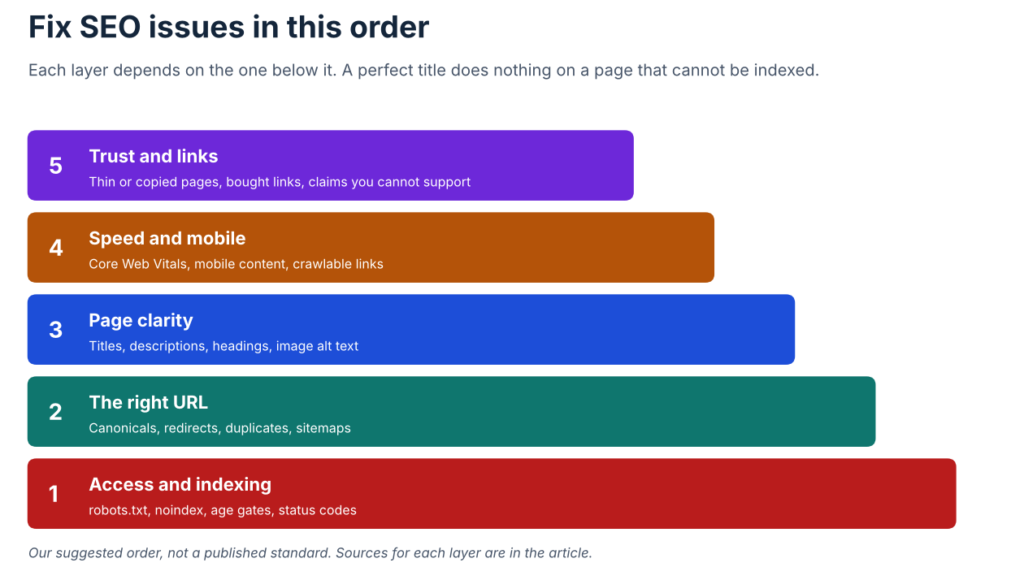
Figure 1. Fix issues in this order. Each layer depends on the one below it.
How to use this guide
Start at issue 1 and work down. The first seven issues decide whether your pages can be found and indexed at all; fixing a title on a page that is blocked wastes the effort. If you can only spend an hour, check issues 1 to 4 on your most important pages.
Two tools make most checks quick and free. The first is Search Console’s Page indexing report, which lists why Google did not index some URLs and links to the URL Inspection tool for single pages. The second is “view source” in your browser, which shows the tags a crawler sees. For anything else, each issue below names the check.
A note on data: this guide quotes no search volumes or difficulty scores, and it does not show results from a site audit. Where we describe what a tool or search engine does, the statement comes from the named documentation.
Group 1: Access and indexing
- Using robots.txt to hide pages
What it looks like. A “Disallow” line blocks a folder or page, in the belief that this keeps it out of search.
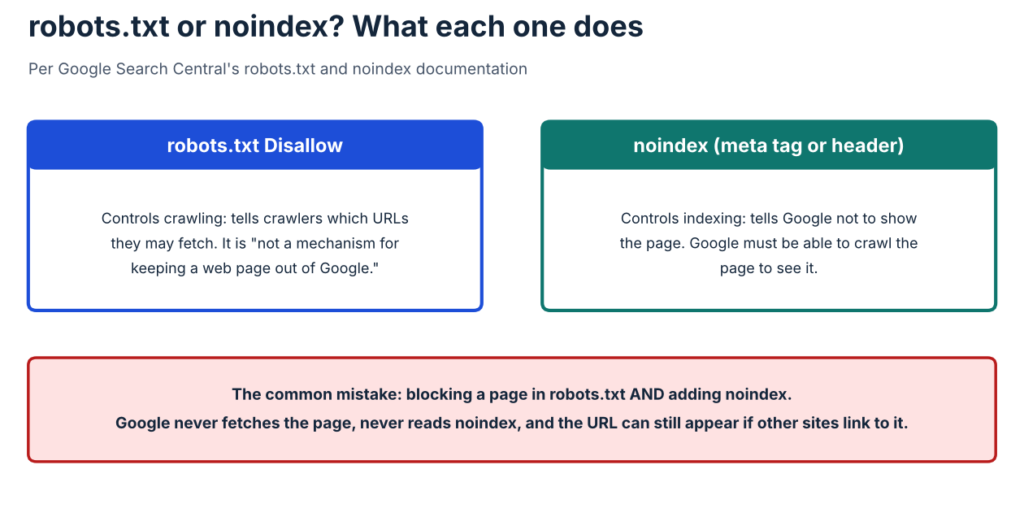
Why it matters. Google’s robots.txt introduction (last updated 10 December 2025) says a robots.txt file “tells search engine crawlers which URLs the crawler can access on your site,” and that it “is not a mechanism for keeping a web page out of Google.” A disallowed URL can still be indexed if other sites link to it, and may appear without a description. The page tells site owners to use noindex or password protection to keep pages out of search.
How to check. Open yoursite.com/robots.txt and read every Disallow line. Then check the Page indexing report for “Blocked by robots.txt.”
How to fix. Decide what each blocked URL is for. If it should be kept out of Google, remove the block and add noindex. If it should be crawled and indexed, remove the block. If it contains anything sensitive, use a login, because robots.txt is not a security measure.
- Leftover or conflicting noindex
What it looks like. A staging site’s noindex tag goes live with the new design. Or a page has both a robots.txt block and a noindex tag.
Why it matters. Google’s noindex documentation says to use <meta name=”robots” content=”noindex”> or an X-Robots-Tag: noindex header. It adds that the page “must not be blocked by a robots.txt file,” because otherwise Google never reads the directive and the URL can still show up in results. The Page indexing report lists “URL marked ‘noindex'” as a reason pages are left out, and says that is fine if intended.
Figure 2. robots.txt controls crawling; noindex controls indexing. Blocking a page in robots.txt hides its noindex tag from Google.
How to check. Use URL Inspection on a key page and look at the indexing status. In “view source,” search for “noindex.” Check the response headers for X-Robots-Tag.
How to fix. Remove noindex from pages you want in search. For pages you want out, keep noindex and make sure robots.txt does not block them. After a launch or migration, repeat this check on your top ten pages.
- An age gate that blocks search engines
What it looks like. Visitors see a “Are you over 18?” screen before any content. Crawlers are shown only that screen, so every page looks the same.
Why it matters. Google’s guidelines for sites with explicit content (last updated 17 September 2026) say Googlebot should be able to crawl gated content without triggering the gate, after verifying that the request really comes from Googlebot. Otherwise “it may cause your site to rank poorly on Google Search.” The page also warns that hidden non-explicit content can lead to the whole site being classified as explicit.
How to check. In URL Inspection, run a live test and look at the rendered page and screenshot. If it shows the gate instead of your content, Google cannot see the page.
How to fix. Work with your developer or platform to serve content to verified Googlebot requests while still protecting visitors, and follow Google’s guidance for verifying Googlebot. Age checks may also be required by law in your markets, so this is a decision to make with legal advice, not a shortcut around it.
- Wrong status codes: soft 404s and server errors
What it looks like. A deleted page shows a friendly “not found” message but returns a 200 response. Or a server error returns a 5xx code for hours.
Why it matters. Google’s page on HTTP status codes (last updated 4 February 2026) says Google treats all 4xx errors except 429 alike, and that “newly encountered 404 pages aren’t processed.” A 2xx response with error-like content is shown in Search Console as a soft 404. For 5xx and 429 errors, Google’s crawlers “temporarily slow down with crawling,” and already indexed URLs “are preserved in the index, but eventually dropped” if errors continue.
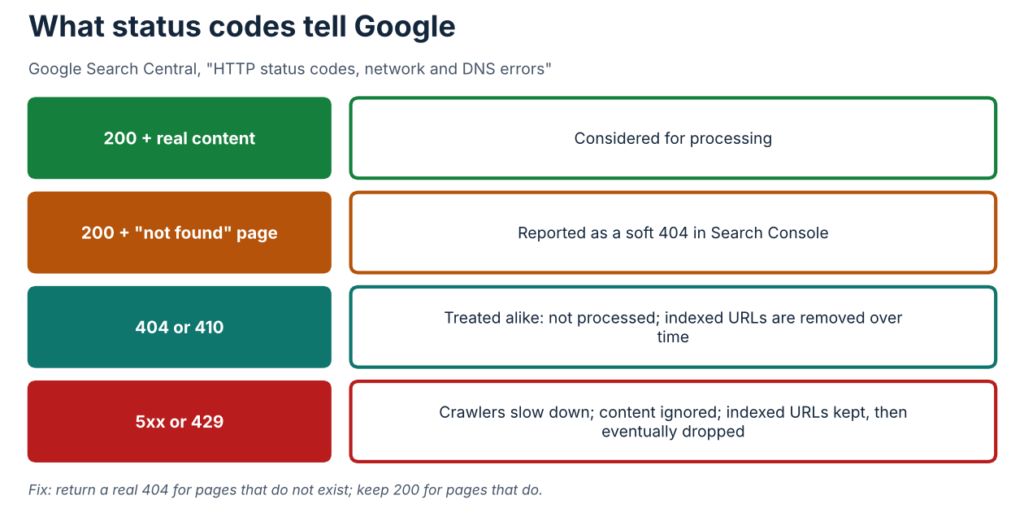
Figure 3. What each response tells Google, per its status code documentation.
How to check. Open the Page indexing report and look for “Soft 404.” Request a made-up URL on your site and confirm it returns a real 404 status, using your browser’s developer tools or a header checker.
How to fix. Return a real 404 (or 410) for pages that do not exist. Keep 200 only for pages with content. If a 5xx error was a temporary problem, fix the server and watch the report; Google says it raises its crawl rate again once the server returns 2xx.
- The wrong kind of redirect
What it looks like. A permanent move uses a temporary redirect, or a page uses JavaScript to send visitors elsewhere.
Why it matters. Google’s redirects documentation (last updated 14 April 2026) says permanent redirects (301 or 308) tell Google to show the target URL in results, while temporary redirects (302, 303, 307) keep the source URL in results. It recommends server-side redirects “whenever possible,” treats meta refresh as a fallback, and says to use JavaScript redirects only “if you can’t do server-side or meta refresh redirects,” because Google may never see them if rendering fails.
How to check. Request an old URL and look at the status code it returns. Check that http redirects to https, and that the www and non-www versions go to one preferred version.
How to fix. Use a server-side 301 or 308 for permanent moves. Redirect old URLs to the closest relevant page, not to the home page. Keep a list of redirected URLs after any migration.
Group 2: The right URL
- Duplicate URLs and wrong canonicals
What it looks like. The same page is reachable at several addresses (http and https, with and without a trailing slash, with tracking parameters). Or a template sets the same canonical tag on many different pages.
Why it matters. Google’s page on consolidating duplicate URLs (last updated 10 July 2026) calls redirects and rel=”canonical” annotations “a strong signal” for the preferred URL, and a sitemap “a weak signal.” Google decides the final canonical. The page lists mistakes to avoid, including naming different canonicals in different places, using relative paths, specifying a fragment, listing HTTP URLs in sitemaps, and letting JavaScript change the canonical. It also says that signals from other sites to a duplicate can be merged into the preferred URL. Our reading: a template that points many different pages at one canonical gives Google a strong signal that they are the same page, which is rarely what you want.
How to check. Open “view source” on five different page types and search for rel=”canonical”. Confirm each page points to itself (or to a deliberate preferred version). In the Page indexing report, look for “Duplicate without user-selected canonical”.
How to fix. Make each indexable page self-canonical. Fix the template if one setting is applied everywhere. Redirect true duplicates. Keep the canonical, the sitemap and internal links consistent.
- Sitemap problems
What it looks like. The sitemap lists redirected, noindexed or non-canonical URLs. Or it is out of date.
Why it matters. Google’s sitemaps overview says a sitemap “doesn’t guarantee that all the items in your sitemap will be crawled and indexed,” that sites with about 500 pages or fewer may not need one, and that many content management systems already provide one. A sitemap is best seen as a list of the URLs you want found, so it should match your canonical and indexing choices.
How to check. Open your sitemap, and sample a few dozen URLs. Check that each returns 200, is indexable and is its own canonical.
How to fix. List only canonical, indexable URLs. Remove redirected and deleted ones. Submit the sitemap in Search Console and check the report for errors.
Group 3: Page clarity
- Duplicate, vague or stuffed titles
What it looks like. Many pages share one title, or titles say only “Home” or the brand name, or repeat the same keyword three times.
Why it matters. Google’s title link guidance (last updated 10 December 2025) says every page should have a title, that titles should be descriptive and concise, and that each should be unique. It warns that repeated or boilerplate titles make pages hard to tell apart and that keyword stuffing “can look spammy.” It also lists reasons Google may rewrite a title, including half-empty titles, inaccurate titles and “micro-boilerplate,” where similar pages share near-identical titles.
How to check. Export your page titles (most crawlers and many CMS plug-ins can do this) and sort them. Look for duplicates and empty ones.
How to fix. Give each page a title that says what that page is, with the brand at the start or end. For similar pages, add the detail that differs. If Google rewrites titles, compare the rewritten version with the page and fix the mismatch.
- Descriptions and snippets left to chance
What it looks like. Pages have no meta description, or the same one everywhere.
Why it matters. Google’s snippet guidance says it sometimes uses the meta description and sometimes builds the snippet from the page’s content. A description is a way to offer a summary, not a way to control the result.
How to check. Search for your page and read the snippet Google shows. Compare it with the page.
How to fix. Write a short, accurate description per page, and make sure the first paragraph of the page answers the query. Do not repeat the same description across pages.
- Images without useful text
What it looks like. Images have no alt text, filenames such as IMG00023.JPG, or are added as CSS backgrounds.
Why it matters. Google’s image guidance (last updated 2 March 2026) calls alt text “the most important attribute when it comes to providing more metadata for an image,” says good alt text is “information-rich content that uses keywords appropriately,” and prefers descriptive filenames like “my-new-black-kitten.jpg” to “IMG00023.JPG.” It says Google does not index CSS background images, so important images should use <img> elements. Alt text also works as anchor text when an image is a link.
How to check. View source and search for <img tags missing alt. Check the filenames.
How to fix. Write a short description of what the image shows. Keep it natural, not stuffed. Use <img> for images that matter. For any image that shows people, make sure you have the rights and consent, and keep content non-explicit on pages you want in general search.
Group 4: Speed, mobile and links
- Slow or unstable pages
What it looks like. Pages load slowly on a phone, shift while loading, or respond late to taps.
Why it matters. Google’s Core Web Vitals documentation (last updated 10 December 2025) tells site owners to “strive to have LCP occur within the first 2.5 seconds,” an INP “of less than 200 milliseconds,” and a CLS score “of less than 0.1.” It names Search Console’s Core Web Vitals report as one way to see how your pages perform.
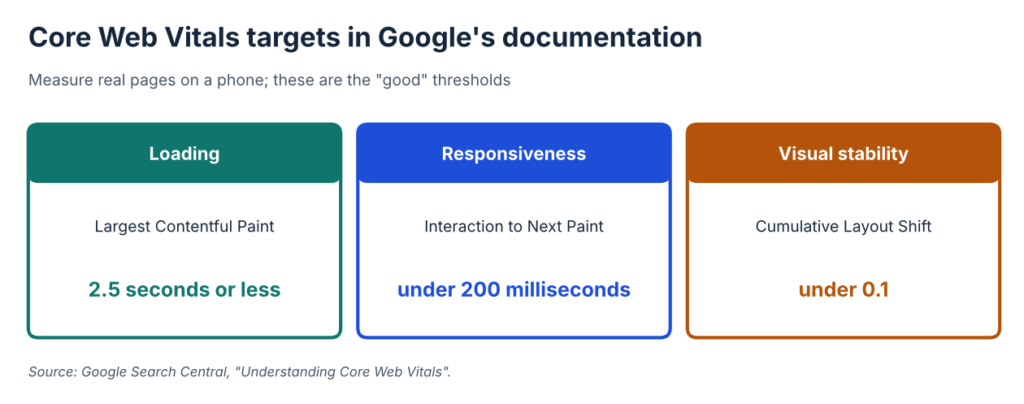
Figure 4. Core Web Vitals targets as stated in Google’s documentation.
How to check. Open the Core Web Vitals report in Search Console and test your top pages on a real phone. Use a speed-testing tool for lab results, and treat them as hints, not guarantees.
How to fix. Start with the heaviest items: oversized images, unused scripts, third-party widgets and ad or chat scripts. Reserve space for images and embeds so the layout does not jump. Retest after each change so you know which one helped.
- Different content on mobile and desktop
What it looks like. The mobile version hides text, removes sections or loads key content only after a tap.
Why it matters. Google’s mobile-first indexing guidance (last updated 10 December 2025) says Google uses “the mobile version of a site’s content, crawled with the smartphone agent, for indexing and ranking.” Its common mistakes include missing or hidden content, lazy-loading primary content on user interaction (“Don’t lazy-load primary content upon user interaction”), blocked resources, mismatched structured data and different robots tags on mobile and desktop.
How to check. Compare a page on a phone with the same page on a desktop. Run URL Inspection with the smartphone crawler and look at the rendered result.
How to fix. Make the mobile page carry the same main content, headings, links and structured data as the desktop page. Use accordions or tabs rather than removing text. Do not block images or scripts that the page needs.
- Links search engines cannot follow, and vague anchors
What it looks like. Navigation relies on JavaScript click handlers instead of real links. Link text says “click here.”
Why it matters. Google’s link best practices (last updated 10 December 2025) say “Generally, Google can only crawl your link if it’s an <a> HTML element” with an href. Good anchor text is “descriptive, reasonably concise, and relevant to the page that it’s on and to the page it links to,” and generic labels give little context. Every page you want found should have at least one link from another page on your site.
How to check. In “view source,” confirm your menu and key links are <a href> elements. Look at your most important pages and see how many internal links point to them.
How to fix. Replace script-only links with real links. Rewrite vague anchors to describe the destination. Link to your important pages from related pages, in context.
Group 5: Content and trust
- Thin, copied or doorway pages
What it looks like. A site has hundreds of near-identical pages that differ only by a place name or service. Or pages copy competitor text with small changes.
Why it matters. Google’s spam policies (last updated 28 August 2026) define scraping as “taking content from other sites, often through automated means,” and list “copying content from other sites, modify it only slightly” as an example. They define scaled content abuse as many pages generated “for the primary purpose of manipulating search rankings,” and doorway abuse as pages “created to rank for specific, similar search queries” that send visitors to intermediate pages less useful than the destination.
How to check. Read five pages from the same template, side by side. If you can swap the place name and nothing else changes, they are thin. Search a distinctive sentence in quotes to see whether it appears elsewhere.
How to fix. Merge near-duplicate pages. Add what is specific to each page: real details, real questions answered, real examples. Remove or redirect pages that add nothing. Google’s helpful content guidance asks “Why” each page exists: if the answer is only “to rank,” rewrite or remove it.
- Keyword stuffing and the wrong meaning
What it looks like. A page repeats “adult SEO” in every sentence. Or it targets a phrase whose main meaning is something else.
Why it matters. Google’s SEO Starter Guide says “excessively repeating the same words over and over (even in variations) is tiring for users,” and that Google Search “doesn’t use the keywords meta tag.” It also says Google’s “language matching systems are sophisticated,” so exact repetition matters less than people think. In this sector, words like “adult” and “escort” can also match unrelated topics, so check what the first page of results shows for a phrase before you target it.
How to check. Read the page aloud. If it sounds like a list of keywords, it is. Search your target phrase and see whether the results match your meaning.
How to fix. Write for the reader. Use the main term where it fits naturally, and use plain variations. Add context words that fix the meaning, and answer the question the searcher actually has.
- Link spam and risky link buying
What it looks like. Links are bought in bulk, traded for a post, or placed with the same keyword anchor repeated.
Why it matters. Google’s spam policies list “buying or selling links for ranking purposes,” “excessive link exchanges,” and “links with optimized anchor text in articles, guest posts, or press releases distributed on other sites” as link spam. The page says links bought or sold for advertising should be marked with rel=”nofollow” or rel=”sponsored”. Google’s page on qualifying outbound links says to use sponsored for “advertisements or paid placements.” Google’s disavow help page calls the disavow tool “an advanced feature” that “should only be used with caution,” and says that in most cases Google can assess which links to trust without it.
How to check. Export your links from Search Console’s Links report. Look for patterns: the same anchor text repeated, links from unrelated sites, links from pages that exist only to carry links.
How to fix. Stop buying links that are not qualified. Ask site owners to remove links you placed. Use the disavow tool only if you have many manipulative links and a manual action, or are likely to get one. Focus on links you can earn: useful guides, data and reference pages.
Group 6: Process
- Judging too fast, and changing everything at once
What it looks like. A site changes titles, templates, redirects and content in one week, then checks rankings after three days.
Why it matters. Google’s SEO Starter Guide says changes can take from a few hours to several months to show effect. If you change many things together you cannot tell which one helped or hurt.
How to check. Keep a change log with dates, and compare the same periods in Search Console.
How to fix. Group changes by layer (see Figure 1), make them in batches, and wait before judging. Record what you changed and why.
- Hiring on guarantees
What it looks like. An agency promises first-page rankings in 30 days.
Why it matters. Google’s page on whether you need an SEO warns against anyone who guarantees rankings, and notes that no one can guarantee a position.
How to check. Ask what they will check first, what you will receive, and how they report what they cannot verify.
How to fix. Choose someone who explains the work, shows how they measure it, and says what they will not do.
Common mistakes when fixing SEO issues
Fixing the list is easier than fixing the habits around it. Watch for these.
- Fixing titles before checking that pages can be indexed.
- Changing many things at once, so nothing can be traced.
- Trusting a tool’s score without opening the page itself.
- Copying a fix from a forum without reading the matching Google page.
- Leaving staging settings, such as noindex or blocks, in place after launch.
- Forgetting to re-check after a redesign, a plug-in update or a migration.
- Treating “not indexed” as an error in every case, when some pages should stay out.
- Never writing down what was changed and when.
A useful habit is a one-page checklist built from the 18 issues above. Run it after every launch, and keep the dated results. When something drops, the checklist and the change log are the fastest way to find out what moved.
The 18 issues at a glance
This table is our judgment of effort and the cost of ignoring each issue for a typical small adult site. It is not a measured result.
| # | Issue | Effort to fix | Cost if ignored | First check |
| 1 | robots.txt used to hide pages | Low | High | Read robots.txt |
| 2 | Leftover or conflicting noindex | Low | High | URL Inspection on key pages |
| 3 | Age gate blocks crawlers | Medium | High | Live test and screenshot |
| 4 | Soft 404s and server errors | Medium | Medium | Page indexing report |
| 5 | Wrong redirects | Medium | Medium | Request old URLs |
| 6 | Duplicate URLs, wrong canonicals | Medium | High | View source on five page types |
| 7 | Sitemap problems | Low | Low | Sample sitemap URLs |
| 8 | Duplicate or vague titles | Low | Medium | Export titles |
| 9 | Weak descriptions | Low | Low | Read your snippets |
| 10 | Images without alt text | Low | Low | Search for missing alt |
| 11 | Slow or unstable pages | Medium | Medium | Core Web Vitals report |
| 12 | Mobile and desktop differ | Medium | High | Compare on a phone |
| 13 | Links not crawlable | Medium | Medium | View source on menus |
| 14 | Thin or doorway pages | High | High | Compare template pages |
| 15 | Keyword stuffing, wrong meaning | Medium | Medium | Read aloud; check results |
| 16 | Link spam | High | High | Links report |
| 17 | Judging too fast | Low | Medium | Start a change log |
| 18 | Hiring on guarantees | Low | High | Ask what they will not do |
A 30-day fix plan
This order is our judgment, not a published standard.
Week 1: access and indexing (issues 1 to 5). Read robots.txt and the Page indexing report. Check noindex tags and age gates on your top pages. Test a made-up URL for a real 404. Check redirects.
Week 2: the right URL (6 and 7). Check canonicals on every page type. Clean the sitemap.
Week 3: page clarity and speed (8 to 13). Fix duplicate titles and missing alt text. Compare mobile and desktop. Fix script-only links. Test speed.
Week 4: content, links and process (14 to 18). Review template pages for thin content. Review your links. Start a change log. Decide whether you need help.
Adult and escort sector: what changes
Four things differ for adult and escort sites.
Crawlers and age gates. Issue 3 matters more here. Check what Googlebot sees on your key pages before anything else.
Explicit and non-explicit content. Google recommends that sites with a significant mix “group the explicit pages on a separate domain or subdomain.” Decide where each page belongs, label explicit pages with the adult rating tag or the RTA label that Google accepts, and keep explicit images off pages you want in general search.
Words with double meanings. “Adult” and “escort” match unrelated topics. Check the results for any phrase you plan to target.
Rules outside search. Reviews, email and advertising have their own rules. Check the FTC’s guidance on reviews and CAN-SPAM if you operate in the US, and the platform rules for any ads you buy. Get legal advice for your markets.
Three scenarios
These are illustrative situations built from the checks above, not case studies.
A directory operator. Listing pages exist at three URLs each (with and without a trailing slash, and with a tracking parameter). The operator checks the canonical on each version, makes the listing page self-canonical, redirects the duplicates and removes them from the sitemap.
An escort agency. The site launched after a redesign and traffic fell. The agency opens the live site’s source and finds a noindex tag copied from the staging site. It removes the tag, requests indexing in Search Console and logs the date.
A platform marketer. City pages differ only by the city name. The marketer merges the weakest pages, adds real local details to the rest, and redirects the removed ones.
When to hire adult and escort SEO specialists
You can fix many of these yourself. You may want to hire adult and escort SEO specialists when:
- you cannot tell what crawlers see behind an age gate;
- you have thousands of pages, several domains or several languages;
- traffic has fallen and the cause is not obvious;
- you are planning a migration or a template change;
- you have a history of bought links that need an audit;
- you do not have time to run, record and re-check the work.
If you decide to hire adult and escort SEO specialists, ask what they will check first and what you will receive, how they handle age gates and explicit-content separation, which link tactics they refuse, and how they report what they cannot verify. Be wary of guarantees, as issue 18 explains.
Escort Marketing Agency (EMA) is a digital marketing agency for adult businesses, not an adult service. On its adult SEO page, EMA describes a free audit as a focused review of your public website that identifies visible obstacles. EMA says plainly that it is not a full crawl or an account-level analytics audit. EMA also publishes its own SEO mistakes and solutions article for adult site owners, which you can read alongside this guide. Judge any provider, EMA included, by the questions above.
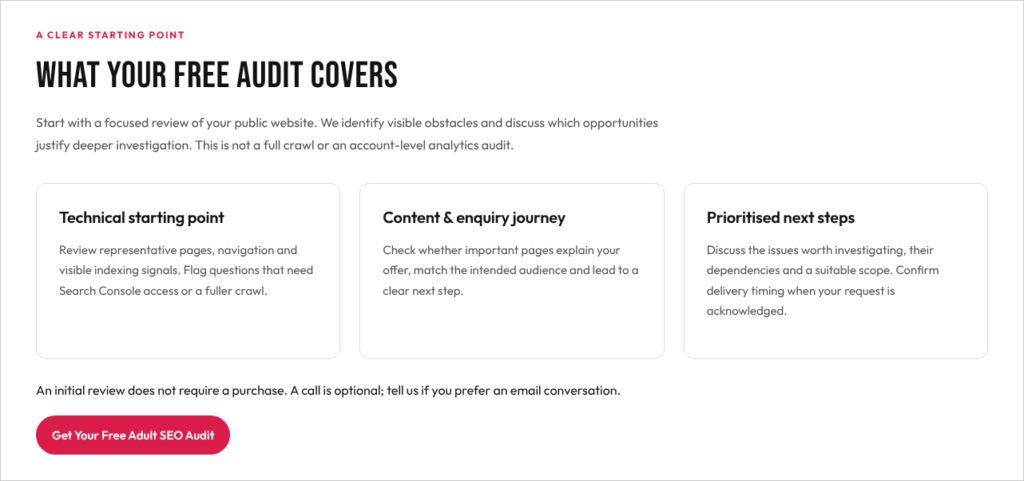
Figure 5. EMA’s description of its free audit scope on its adult SEO page, as it appeared on 7 November 2026.
Frequently asked questions
What is the most common SEO mistake?
Blocking or hiding pages by accident: a robots.txt rule, a leftover noindex tag, or an age gate that crawlers cannot pass. These stop everything else from working.
How do I know whether my pages are indexed?
Use Search Console’s Page indexing report and the URL Inspection tool. A “not indexed” status is not always a problem, so read the reason for each group.
Does robots.txt remove a page from Google?
No. Google says it is not a mechanism for keeping a page out of search. Use noindex or a login.
Is duplicate content a penalty?
Google’s canonical documentation describes duplicates as a signal-consolidation issue: you choose a preferred URL so Google can merge signals. Copying other sites’ content, or generating many near-identical pages, is a spam concern.
How long do fixes take to show?
Google’s SEO Starter Guide says changes can take from a few hours to several months. Make changes in batches and record the dates.
Do I need to worry about Core Web Vitals?
They are a set of targets Google documents for loading, responsiveness and stability. Check your own report and fix what is clearly slow.
Can I fix this without a specialist?
Many of the checks above need no special tools. A specialist helps when you cannot see what crawlers see, when the site is large, or when you do not have time.
What should I ask a specialist before hiring?
What they will check first, what you will receive, which tactics they refuse, how they measure results, and how they report what they cannot verify.
Can a specialist guarantee rankings?
No. Google warns against anyone who offers that.
Final thoughts
Most SEO issues are fixable, and most are found by checking the basics in the right order: can search engines reach the page, can they index it, is the URL the right one, is the page clear, is it fast on a phone, and can you trust what it says and who links to it. For a second read on the same theme, see EMA’s SEO mistakes and solutions. Start with the first layer, fix one thing at a time, and write down what you changed. In the adult and escort sector, add age gates, explicit-content separation and double-meaning keywords to your checklist.
If you would like help prioritising, you can hire adult and escort SEO specialists. Connect with us today or visit https://escortmarketing.agency/.
References
- Google Search Central, “Introduction to robots.txt” (last updated 10 December 2025): https://developers.google.com/search/docs/crawling-indexing/robots/intro
- Google Search Central, “Block Search indexing with noindex”: https://developers.google.com/search/docs/crawling-indexing/block-indexing
- Google Search Central, “Guidelines for sites with explicit content” (last updated 17 September 2026): https://developers.google.com/search/docs/specialty/explicit/guidelines
- Google Search Central, “HTTP status codes, and network and DNS errors” (last updated 4 February 2026): https://developers.google.com/search/docs/crawling-indexing/http-network-errors
- Google Search Central, “Redirects and Google Search” (last updated 14 April 2026): https://developers.google.com/search/docs/crawling-indexing/301-redirects
- Google Search Central, “What is canonicalization” / “Consolidate duplicate URLs” (last updated 10 July 2026): https://developers.google.com/search/docs/crawling-indexing/consolidate-duplicate-urls
- Google Search Central, “Sitemaps overview”: https://developers.google.com/search/docs/crawling-indexing/sitemaps/overview
- Google Search Console Help, “Page indexing report”: https://support.google.com/webmasters/answer/7440203
- Google Search Central, “Influencing your title links in search results” (last updated 10 December 2025): https://developers.google.com/search/docs/appearance/title-link
- Google Search Central, “Control your snippets in search results”: https://developers.google.com/search/docs/appearance/snippet
- Google Search Central, “Google Images SEO best practices” (last updated 2 March 2026): https://developers.google.com/search/docs/appearance/google-images
- Google Search Central, “Understanding Core Web Vitals” (last updated 10 December 2025): https://developers.google.com/search/docs/appearance/core-web-vitals
- Google Search Central, “Mobile-first indexing best practices” (last updated 10 December 2025): https://developers.google.com/search/docs/crawling-indexing/mobile/mobile-sites-mobile-first-indexing
- Google Search Central, “SEO link best practices” (last updated 10 December 2025): https://developers.google.com/search/docs/crawling-indexing/links-crawlable
- Google Search Central, “Spam policies for Google web search” (last updated 28 August 2026): https://developers.google.com/search/docs/essentials/spam-policies
- Google Search Central, “Qualify your outbound links” (last updated 10 December 2025): https://developers.google.com/search/docs/crawling-indexing/qualify-outbound-links
- Google Search Console Help, “Disavow links”: https://support.google.com/webmasters/answer/2648487
- Google Search Central, “Creating helpful, reliable, people-first content”: https://developers.google.com/search/docs/fundamentals/creating-helpful-content
- Google Search Central, “SEO Starter Guide” (last updated 10 December 2025): https://developers.google.com/search/docs/fundamentals/seo-starter-guide
- Google Search Central, “Do you need an SEO?”: https://developers.google.com/search/docs/beginner/do-i-need-seo
- Escort Marketing Agency, “Adult SEO” page (public HTML and screenshot, 7 November 2026): https://escortmarketing.agency/adult-seo/
- Escort Marketing Agency, “Common SEO Mistakes (and How to Fix Them!)” (blog): https://escortmarketing.agency/seo-mistakes-and-solutions/
- First-party observations (not published sources): escortmarketing.agency sitemap, canonical tags and response codes checked 30 October and 6 to 7 November 2026.